One Operation, One Class: The Two Open-Source Libraries Behind MagicDoor
Our backend and our front ends follow the same rule: what the app does lives in small use cases, not in services or components. Both libraries are open source.

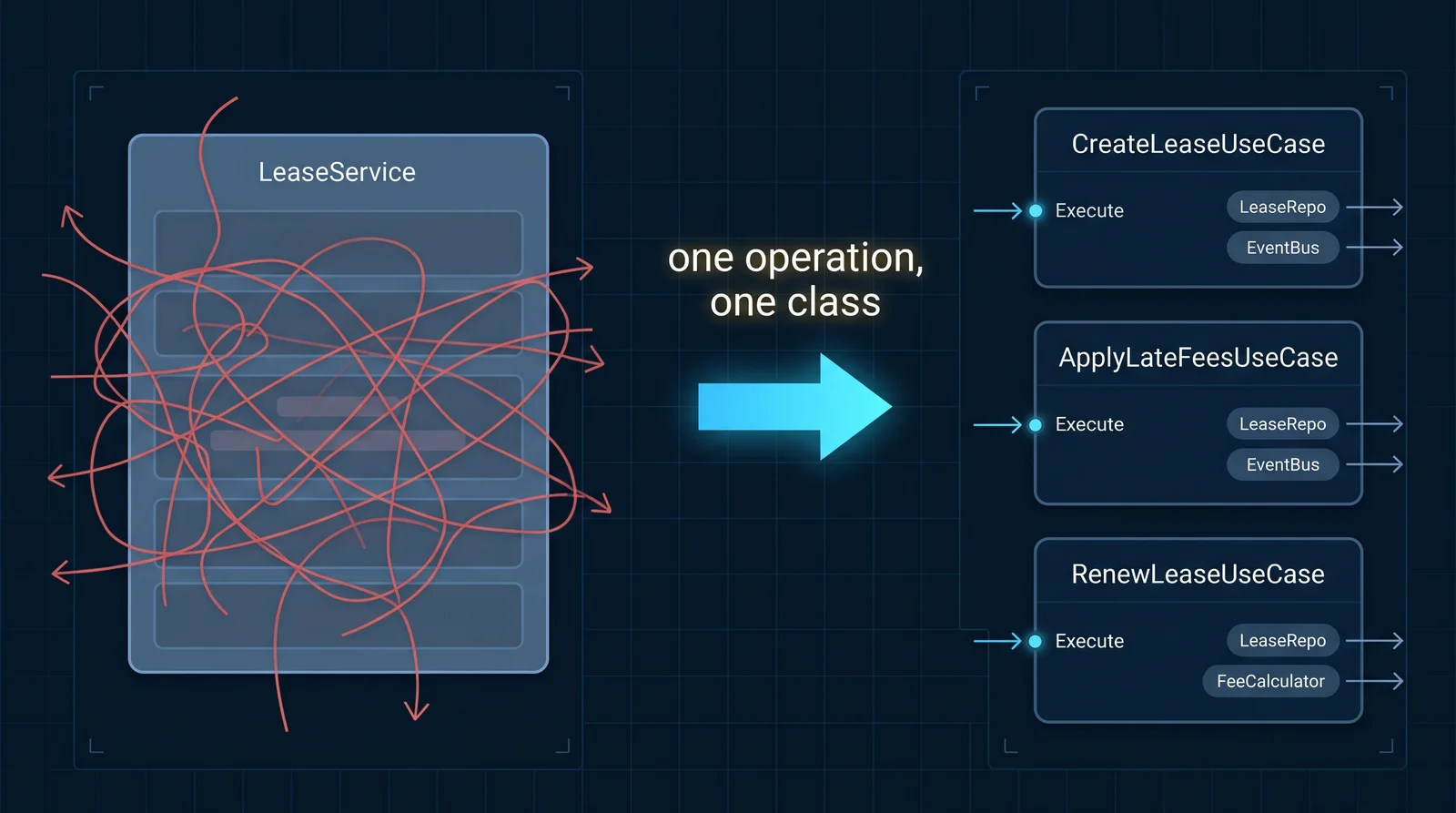
Ask someone, or an AI coding agent, to change how late fees work. In most codebases they open a LeaseService that a hundred things call, change a method in the middle of it, and hope. The reviewer has to read the whole class to know what else moved.
We build differently, on the backend and on the front end, and we've open-sourced both halves:
- MagicCSharp: business logic as small use cases, for C# and .NET. MIT licence.
- magic-use-case: use cases, presentations and gateways for front-end TypeScript, with adapters for React and Solid. Apache 2.0.
Every C# service at MagicDoor, Revoco, Agent Parley and LoreStage follows the MagicCSharp shape. Every MagicDoor portal runs on magic-use-case, and so does LoreStage's web app.
The idea both share
One operation is one class with one entry point. "Create a lease" is a class. "Apply late fees" is a class. "Load the tenants" is a class. Each one lists everything it can touch in its constructor, so its scope is visible at a glance.
That sounds small. In practice it changes three things:
- A change has a natural size. The diff for "change late fees" is one class and its test, not a slice through a shared service.
- Callers are one search away. Who uses
ApplyLateFeesUseCase? Everything that takes its interface. - Tests are honest. If you can't test an operation by constructing it directly, it's doing too much.
The MagicCSharp README puts it in one line: an operation is a class you can hold in your head, and infrastructure stays behind an interface.
MagicCSharp: the backend
A use case is a request record, an interface and a class. The interface extends IMagicUseCase, and that's the only framework type in it. This is from the example service in the repository:
public interface ICreateLeaseUseCase : IMagicUseCase
{
    Task<Lease> Execute(CreateLeaseRequest request);
}

public class CreateLeaseUseCase(ILeasesRepository leasesRepository) : ICreateLeaseUseCase
{
    public async Task<Lease> Execute(CreateLeaseRequest request)
    {
        if (request.EndDate <= request.StartDate)
        {
            throw new ValidationException("A lease must end after it starts.");
        }

        return await leasesRepository.Create(new LeaseEdit { /* … */ });
    }
}
There's no wiring to write. Other classes ask for a use case by its interface, like ICreateLeaseUseCase, and .NET's dependency injection hands them the implementation. Normally you'd register every one of those pairs by hand in your startup code. Here, one line at startup, services.AddMagicCSharp(), scans the service for every class that implements an IMagicUseCase interface and registers it.
It's strict about it, too. Two implementations of the same interface, or an interface with no implementation, stops the service at startup. And every registration is resolved once when the service starts, so a missing dependency fails the deploy, not a customer's request.
Around that core, the framework gives a service the pieces every backend rewrites:
- Repositories with filters. Each entity is three records: the entity, an edit and a filter. You write two methods, and get
Get(filter), pagination, soft delete and search as opt-ins, on EF Core and PostgreSQL. - Ids before the insert. Snowflake ids are 64-bit and time-sortable, and are assigned before a row is written.
- Events on any transport. Publish through one dispatcher; handlers are discovered. In-process, Kafka or SQS is a single registration, and publishers and handlers don't change between them.
- Background jobs that don't drift. Interval or time-of-day schedules run from the clock, so an hourly job stays on the hour, and one instance runs each occurrence under a lock.
- Errors that mean something. The domain throws not-found, conflict, invalid-operation or validation; the web layer answers 404, 409, 422 or 400 as problem+json, with the request id.
- Tests that move time. .NET's
TimeProvideris used throughout. Tests run the real use cases against a real PostgreSQL in a throwaway container, with a fake clock the test moves forward: "three days later the fee is still charged once" is a test that advances three days and runs the use case again.
It installs as one package for a web service (dotnet add package MagicCSharp.App), plus the mcs command-line tool.
Built for coding agents
This is the part I care about most. MagicCSharp is described as a framework for developers and their coding agents, and it does three concrete things for the agent.
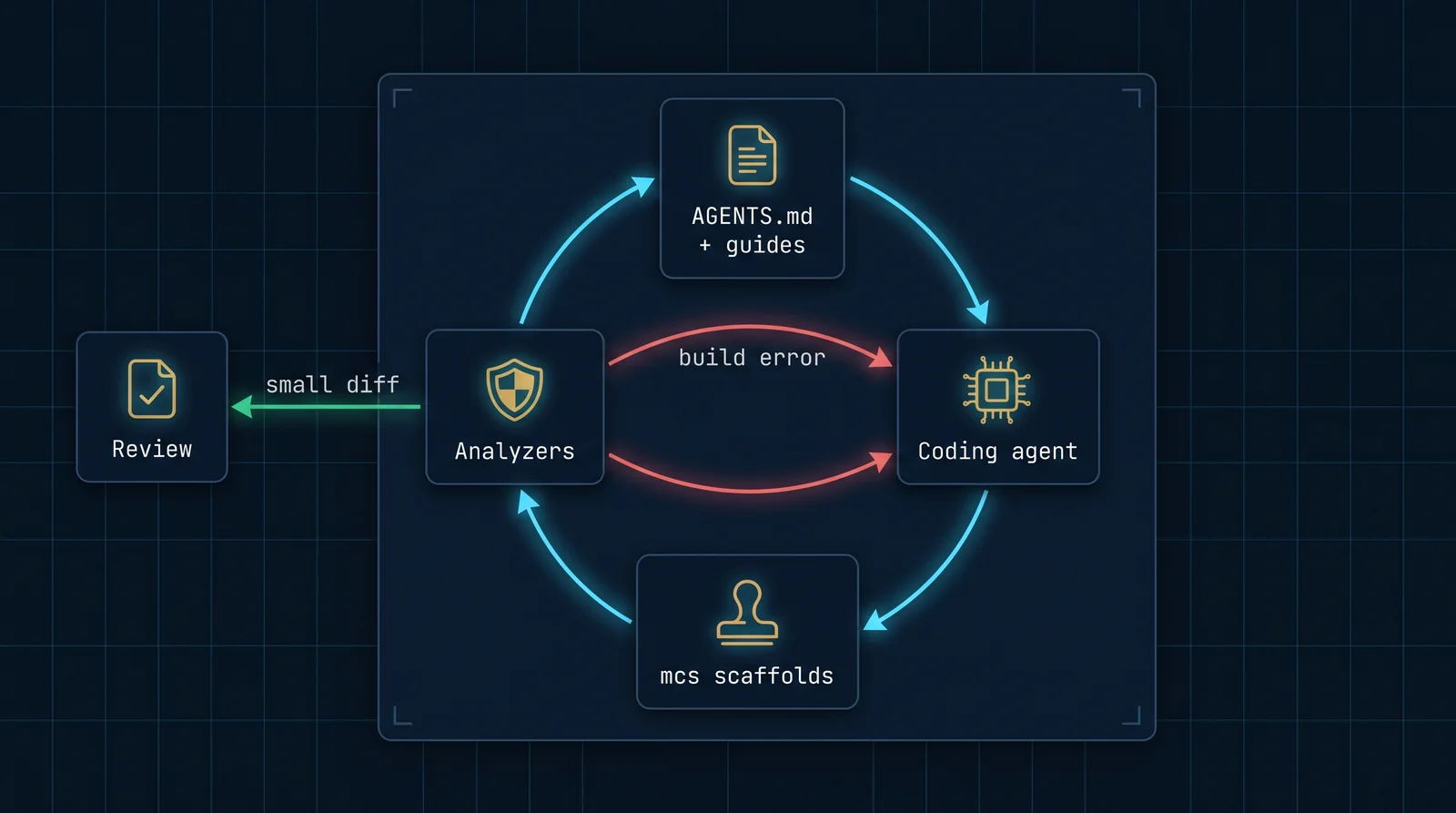
It writes the rules down for the agent. mcs init creates an AGENTS.md of about fifty lines (with a CLAUDE.md that imports it), plus one guide per topic in .ai-knowledge/. The agent reads the index and loads only the guide its task needs. mcs update ai-files keeps the guides in step with the installed version, and never touches your own project notes.
It turns house style into build errors. The analyzers package ships about twenty Roslyn rules. Reaching for DateTime.UtcNow, writing a positional record or naming a dependency useCase fails the build, and the message says what to do instead:
error MCS0008: Replace 'DateTime.UtcNow' with an injected TimeProvider and call 'timeProvider.GetUtcNow()'
An agent can ignore a paragraph in a prompt. It can't ignore a build error. It's the same principle as the workflow we use for coding agents: put every rule where the agent can't skip it.
It makes structure come from a tool. mcs creates services, domains and entities the same way every time, and re-running a command changes nothing. The agent is told to use it, so a new entity looks like every other entity. mcs validate checks the few conventions the compiler can't, and mcs affected tells CI which services a change touched.
magic-use-case: the front end
The front-end library starts from one sentence: your application's behaviour should not live in your components.
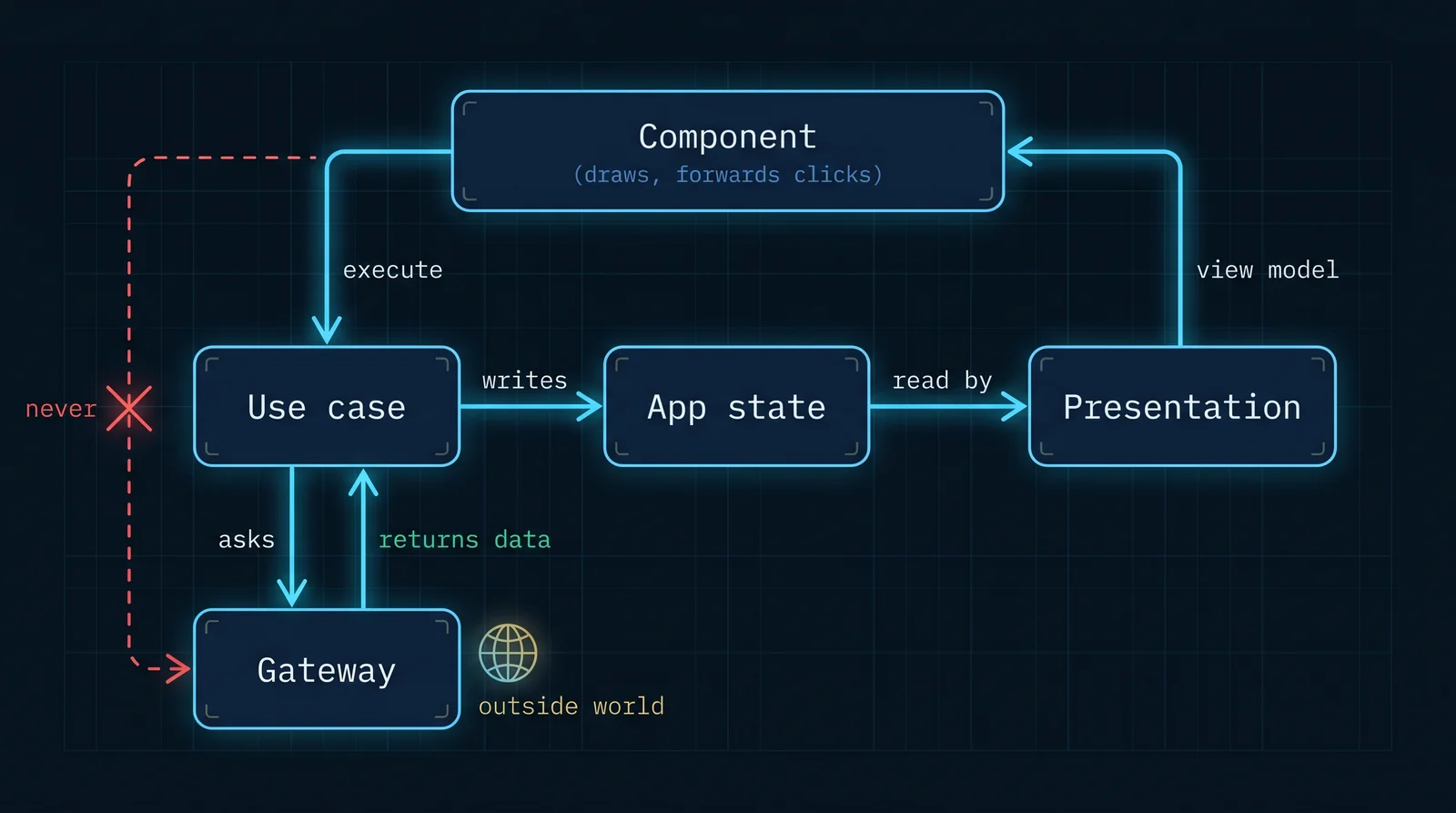
Every feature has five kinds of thing, each with one job:
- Component: draws the screen and forwards the click.
- Use case: decides what should happen, and is the only thing that writes state.
- App state: the one truth.
- Presentation: a pure function that turns state into what the screen shows.
- Gateway: talks to the outside world and returns your own types.
A use case owns one piece of behaviour:
// loadTenantsUseCase.ts
export class LoadTenantsUseCase extends BaseUseCase {
  protected async runLogic() {
    this.getState().tenants = await tenantGateway.list();
  }
}
A presentation is a pure function from state to a view model, where all the formatting, sorting and labelling happens. The component then just calls useUseCase(LoadTenantsUseCase) and usePresenter(presentTenants), and renders.
The important word in the README is enforced. Only a running use case may write state; anything else is refused at runtime. View models are deeply read-only, so writing to one fails at compile time. Running the same use case twice at once is one run, not two. And an ESLint plugin adds the layer rules (a component can't import a gateway) and keeps browser APIs out of use cases and gateways. As on the backend, the rules live in tooling, not in a wiki.
It installs as @magicdoor/magic-use-case-react or @magicdoor/magic-use-case-solid. Both adapters share one core and behave the same.
Why we open-sourced them
Both libraries were extracted from code we run every day, and designed by engineers with years at Amazon, Microsoft and Google behind them. MagicCSharp came out of MagicDoor's backend, so the next service starts from the same defaults instead of a folder copied from the last one. magic-use-case was created by Norbert Nemes, and every MagicDoor portal is built on it.
The opinions in them aren't theoretical. They're what was left after finding out which pieces survive a codebase getting large and a team changing, and, more and more, a lot of that code being written by agents. Small operations, explicit dependencies, rules enforced by tools: that's what makes code reviewable, whoever wrote it.
Try them
- Backend:
dotnet tool install -g MagicCSharp.Cli, thenmcs initin a new folder, and read the generatedAGENTS.md. - Front end:
npm install @magicdoor/magic-use-case-react(or-solid) and follow the five-step quick start. - Read the examples: the MagicCSharp repository has a complete property-management service, and the magic-use-case README builds one feature through all five layers.
- Point your coding agent at them and ask for a change. Then look at the size of the diff.
Issues and pull requests are welcome on both: MagicCSharp and magic-use-case.
Closing
Back to the late fees. Here, the change is ApplyLateFeesUseCase: one class, one Execute, one test class, and its callers one search away. Whether a person or an agent makes it, the reviewer reads the whole diff, and that's the point.